Uploading influencer data into Snöball is a simple process, but there are some guidelines that you should follow to make sure that your data is clean and error-free.
General Guidelines
- Do not modify the template
- Do not add or remove columns
- Do not add any filters
- Do not hide rows or columns
- If copy-pasting data into the spreadsheet, make sure that the text is unformatted.
- If data being pasted has excessive formatting, use the option to paste values only. To do this in either Microsoft Excel or Google Sheets, right-click and select Paste Special->Values Only.

- If data being pasted has excessive formatting, use the option to paste values only. To do this in either Microsoft Excel or Google Sheets, right-click and select Paste Special->Values Only.
- Do not use line breaks in your data
- Review your data for any hidden spaces before or after the cell data
Speakers and Sponsors/Exhibitors
- Do not paste headshots, logos, or any other image into the cells
- The simplest way to send your headshots and logos are through shared public links - providing the direct link to the image hosted online elsewhere.
- If including a URL to headshots or logos, please ensure that the URL is publicly available, with no login required to access.
- If adding headshots or logos, make sure that the file name matches exactly the file name of the image, including file extensions.
> Accepted file formats are: jpg, jpeg, and png.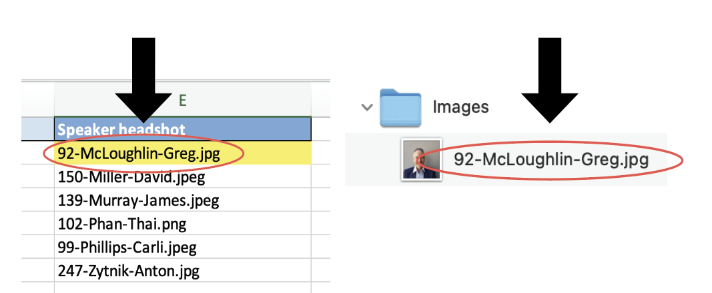
- Speakers with multiple sessions should have sessions separated by a pipe | with no spaces:
- The format to use would be Session 1|Session2. If the format Session 1 | Session 2 is used, an extra unwanted space would be added after Session 1, and another added before Session 2 on the speaker’s Snöball landing page.
- A best practices guide for headshot composition and sizing is available in your Snöball Starter Kit, as well as in our online help resource here .
Data management can be tricky at the best of times, so our team is here to help - please don’t hesitate to reach out to your Snöball project manager or support@snoball.events if you have any questions!